Saturday, 14 July 2018

Portable Hardware Devices for Penetration Testing

Hardware Devices for Penetration Testing | Mr. SAGE

All of us at some point or the other think of a possibility of “remoting” a penetration test. Five years ago, you would have to engineer something like this for to suit your own requirements. However now, there are commercial tools already available that help you do that and much more. This is an attempt to do just that – compile a list of portable hardware devices for penetration testing, which you can plug into the “targeted” network and run your tests from else where. Some of them are commercial and the rest are open source.

List of Portable Hardware Devices for Penetration Testing :

1). Raspberry Pi / BeagleBone Black / Hardkernel ODROID : I am a bit biased towards the Raspberry Pi model 3 as it has the hardware required to be a good tool. You do not need a WiFi dongle, or even a bluetooth chip. Just plug it in, install a good OS like the Kali Linux and you are done! These come pretty cheap and are pretty low profile. They run an awesome Quad Core 1.2GHz Broadcom BCM2837 64bit CPU with 1GB RAM and the BCM43438 wireless LAN and Bluetooth Low Energy (BLE) on board. You can even use them for other purposes. Order them online at Amazon or the official store here. If you want to be extra stealthy, get their RASPBERRY PI ZERO W which offers a single-board computer with wireless and Bluetooth connectivity. An awesome article by the guys at BlackHills Information Security detailing their drop box can be found Here.

2). VIA ARTiGO A900 : I do not know how many of you have heard about this, but they are pretty cool too. These devices run a decent 1.0GHz VIA Elite E1000 Cortex-A9 dual-core SoC along with 2GB DDR3 of onboard SDRAM. It has a Realtek RTL8111G PCIe Gigabit Ethernet controller, and no wireless access. (Get It Here)

3). MiniPwner : The MiniPwner is a penetration testing “drop box”. It is designed as a small, simple but powerful device that can be inconspicuously plugged into a network and provide the penetration tester remote access to that network. It runs a portable TP-Link MR3040 running OpenWRT with a 2000 mAh built-in battery. Multiple penetration testing tools such as aircrack-ng, elinks, ettercap-ng, karma, kismet, nbtscan, netcat, nmap, openvpn, perl 5, samba client, snort, tar, tcpdump, tmux, yafc, and wget all come pre-installed. Two versions are available : MiniPwner Community Edition and a pre-built setup. (Get It Here)

4). DreamPlug / SmilePlug / GuruPlug / SheevaPlug : These come from GlobalScale Technologies and are plug computing devices that run network-based software services. These make a worthy addition to the list of portable hardware devices for penetration testing. (Get Them Here)

5). #r00tabaga : The Ace r00tabaga is similar to the MiniPwner, but has some more features. It can be used as a penetration testing drop box or even as a Hot-Spot honeypot, inconspicuously intercepting WiFi probe requests from every target device. #r00tabaga also runs the running OpenWRT platform with a 2000 mAh built-in battery. This is un-available for order as of now, but sure is a good addition to the list of portable hardware devices for penetration testing. (Get It Here)

6). PWN PLUG R3 / PWN PLUG R4 : If you are lazy and want a fully customized solution for your needs, and you have the money, get these from the guys are Pwnie Express. These are the standard penetration testing devices in a portable form factor with onboard high-gain 802.11a/b/g/n/ac wireless antenna and Bluetooth. These also run Kali Linux and run over 100 OSS-based penetration testing tools including Metasploit, SET, Kismet, Aircrack-NG, SSLstrip, Nmap, Hydra, W3af, Scapy, Ettercap, Bluetooth/VoIP/IPv6 tools! (Get It Here) 

7). LG Nexus 5 : this monster android device officially support some best pentesting rom such as pwn phone & kali nethunter... you can flash these roms in your nexus 5 and convert your android device into a hacking machine..

That’s all from me for now. This list is arranged with no preference to any make or model. I will keep on updating this list of portable hardware devices for penetration testing as I find more devices. If you know of any, let me know.

and if you like this post please like & share with your friends..

Download H4CK3R The Book (An Ethical Hacking ebook For Beginners) : 


& DON'T FORGET TO SUBSCRIBE..!!!


Keep Visiting... Enjoy !!! :)

Labels: , , , , , , , , , , , , , , ,

Saturday, 12 November 2016

Kali-NetHunter - Turn Your Android Phone into a Hacking Machine

Kali-NetHunter - Turn Your Android Phone into a Hacking Machine - THE HACKiNG SAGE

The Kali Linux NetHunter project is the first Open Source Android Penetration Testing platform for Nexus devices, created as a joint effort between the Kali community member “BinkyBear” and Offensive Security. NetHunter supports Wireless 802.11 frame injection, one-click MANA Evil Access Point setups, HID keyboard (Teensy like attacks), as well as BadUSB MITM attacks – and is built upon the sturdy shoulders of the Kali Linux distribution and toolsets. Whether you have a Nexus 5, Nexus 6, Nexus 7, Nexus 9, Nexus 10 or OnePlus One we’ve got you covered. freely downloadable images come with easy to follow installation and setup instructions to get you up and running in no time at all.

Kali-NetHunter - Nexus - THE HACKiNG SAGE
  • 802.11 Wireless Injection and AP mode support with multiple supported USB wifi cards.
  • Capable of running USB HID Keyboard attacks, much like the Teensy device is able to do.
  • Supports BadUSB MITM attacks. Plug in your Nethunter to a victim PC, and have your traffic relayed though it.
  • Contains a full Kali Linux toolset, with many tools available via a simple menu system.
  • USB Y-cable support in the Nethunter kernel – use your OTG cable while still charging your Nexus device!
  • Software Defined Radio support. Use Kali Nethunter with your HackRF to explore the wireless radio space.
As an experienced penetration tester or security professional, it is imperative that you trust the tools you work with. One way to achieve this trust is by having full transparency and familiarity with the code you are running. You are free to read, investigate, and change the build scripts for the NetHunter images. All of this goodness from the house of Offensive Security and developers of Kali Linux!

HID Keyboard and ‘BadUSB’ Attacks

NetHunter images support programmable HID keyboard attacks, (a-la-teensy), as well as “BadUSB” network attacks, allowing an attacker to easily MITM an unsuspecting target by simply connecting their device to a computer USB port. In addition to these built in features, we’ve got a whole set of native Kali Linux tools available for use, many of which are configurable through a simple web interface.

Configuration Management

The Kali NetHunter configuration interface allows you to easily configure complex configuration files through a local web interface. This feature, together with a custom kernel that supports 802.11 wireless injection and preconfigured connect back VPN services, make the NetHunter a formidable network security tool or discrete drop box – with Kali Linux at the tip of your fingers wherever you are!

How To Install ?

1- First Of All You Need A Rooted Nexus/OnePlus One Device With TWRP Recovery,

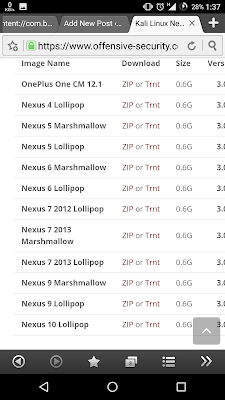
2- Download Kali-NetHunter For Your Device,

Image Name
Download
Size
Version
OnePlus One CM 12.1
0.6G
3.0
Nexus 4 Lollipop
0.6G
3.0
Nexus 5 Marshmallow
0.6G
3.0
Nexus 5 Lollipop
0.6G
3.0
Nexus 6 Marshmallow
0.6G
3.0
Nexus 6 Lollipop
0.6G
3.0
Nexus 7 2012 Lollipop
0.6G
3.0
Nexus 7 2013 Marshmallow
0.6G
3.0
Nexus 7 2013 Lollipop
0.6G
3.0
Nexus 9 Marshmallow
0.6G
3.0
Nexus 9 Lollipop
0.6G
3.0
Nexus 10 Lollipop
0.6G
3.0

3- Move the zip file to your root folder on your android device,

4- Reboot in Recovery,

5- Select the zip folder and flash your system,

6- Let this run for about 15-30 min..

If successful, you have successfully installed Kali Linux with Net Hunter install..


Note: Offensive Security does not provide technical support for NetHunter. Support for NetHunter can be obtained via various methods listed on the Kali Linux Community page. Further documentation can be found at NetHunter Github Wiki.

Wait ....   No Nexus ??? No OnePlus One ??? Using Any Other Android Device ???
Here's How To Install Kali NetHunter On Any Android Device :

1. Download Kali-NetHunter.zip,

Install Kali NetHunter On Any Android Device - THE HACKiNG SAGE

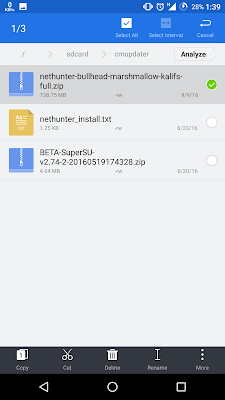
2. After you download it. you will get the file [nethunter-bullhead-marshmallow-kalifs-full.zip],

Install Kali NetHunter On Any Android Device - THE HACKiNG SAGE

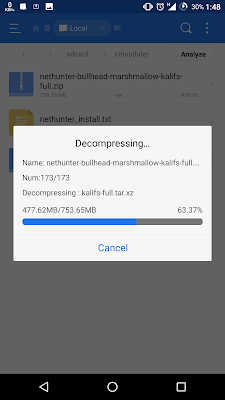
3. Extract it,

Install Kali NetHunter On Any Android Device - THE HACKiNG SAGE

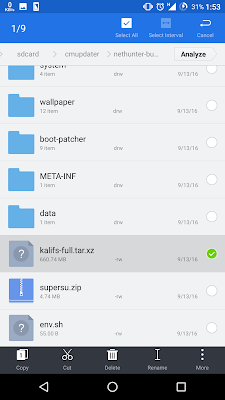
4. From the extracted folder, search for [kalifs-full.tar.xz] file, and move it to /sdcard

Install Kali NetHunter On Any Android Device - THE HACKiNG SAGE

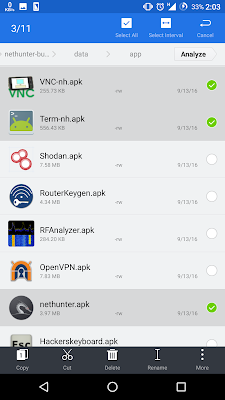
5. From the extracted folder install [nethunter.apk Term-nh.apk VNC-nh.apk] from data/app.

Install Kali NetHunter On Any Android Device - THE HACKiNG SAGE

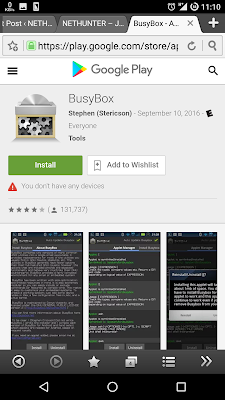
6. Download [busybox.apk] and install it.

Install Kali NetHunter On Any Android Device - THE HACKiNG SAGE

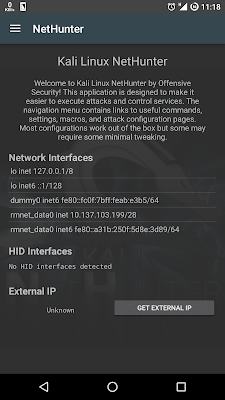
7. Open nethunter app and allow the permissions.

Install Kali NetHunter On Any Android Device - THE HACKiNG SAGE

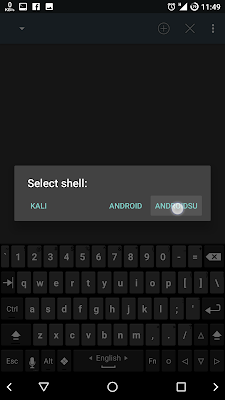
8. Open NetHunter-Terminal and choose ANDROIDSU then type the following commands :

Install Kali NetHunter On Any Android Device - THE HACKiNG SAGE

mount -o remount,rw /system

ln -s /data/data/com.offsec.nethunter/files/scripts/bootkali system/bin/bootkali

ln -s /data/data/com.offsec.nethunter/files/scripts/bootkali_login system/bin/bootkali_login

ln -s /data/data/com.offsec.nethunter/files/scripts/bootkali_bash system/bin/bootkali_bash

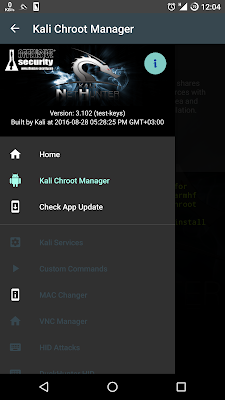
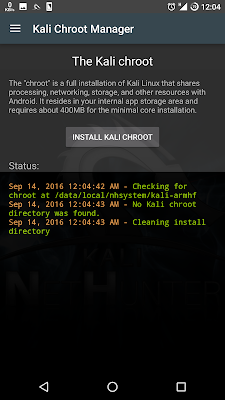
9. Open nethunter and press on Kali Chroot Manager.

Install Kali NetHunter On Any Android Device - THE HACKiNG SAGE

10. Choose INSTALL KALI CHROOT

Install Kali NetHunter On Any Android Device - THE HACKiNG SAGE

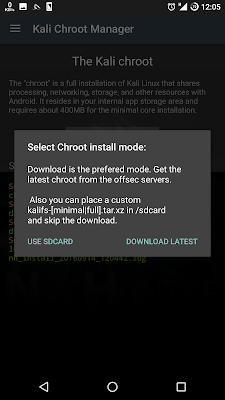
11. Choose USE SDCARD

Install Kali NetHunter On Any Android Device - THE HACKiNG SAGE

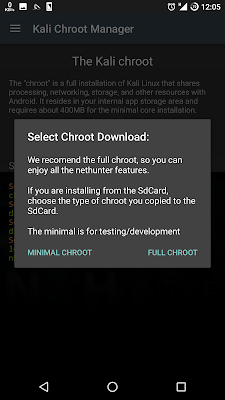
12. Choose FULL CHROOT

Install Kali NetHunter On Any Android Device - THE HACKiNG SAGE

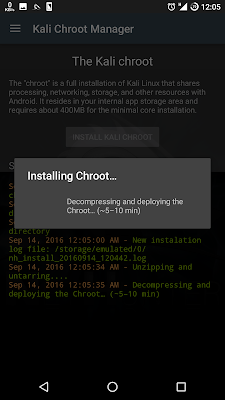
13. Installing Chroot may be take 10 minute to be completed.

Install Kali NetHunter On Any Android Device - THE HACKiNG SAGE

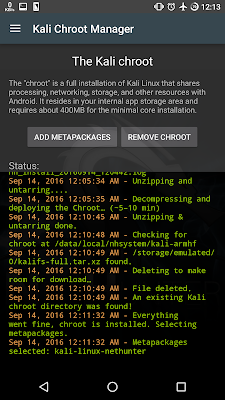
14. After complete, the file [kalifs-full.tar.xz] will be deleted.

Install Kali NetHunter On Any Android Device - THE HACKiNG SAGE

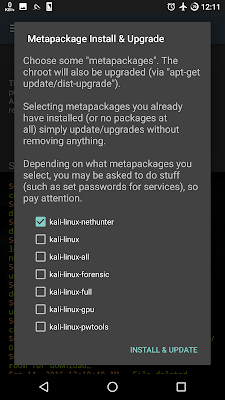
15. You can select any metapackages you want to install or ignore it.

Install Kali NetHunter On Any Android Device - THE HACKiNG SAGE

Done !!! :)

Enjoy & Remember BE ETHICAL.

Looking for the Virtual Images of Kali Linux Penetration Testing Distribution? 


Download Kali Linux VMware and VirtualBox Images : Click Here


and if you like this post please like & share with your friends...

& Don't Forget To....

Like Our Facebook Page : www.facebook.com/thehackingsage

Join Our Facebook Group : www.facebook.com/groups/thehackingsage

Follow Us at Twitter : www.twitter.com/thehackingsage

Follow Us at Instagram : www.instagram.com/thehackingsage

Subscribe Our You Tube Channel : www.youtube.com/c/THEHACKiNGSAGE4U

Keep Visiting... Enjoy !!! :)

Labels: , , , , , , , , , ,